
161 lines
9.9 KiB
Plaintext
161 lines
9.9 KiB
Plaintext
---
|
|
title: Authentication Overview
|
|
label: Overview
|
|
order: 10
|
|
desc: Payload provides highly secure user Authentication out of the box, and you can fully customize, override, or remove the default Authentication support.
|
|
keywords: authentication, config, configuration, overview, documentation, Content Management System, cms, headless, javascript, node, react, nextjs
|
|
---
|
|
|
|
<YouTube
|
|
id="CT4KafeJjTI"
|
|
title="Simplified Authentication for Headless CMS: Unlocking Reusability in One Line"
|
|
/>
|
|
|
|
Authentication is a critical part of any application. Payload provides a secure, portable way to manage user accounts out of the box. Payload Authentication is designed to be used in both the [Admin Panel](../admin/overview), all well as your own external applications, completely eliminating the need for paid, third-party platforms and services.
|
|
|
|
Here are some common use cases of Authentication in your own applications:
|
|
|
|
- Customer accounts for an e-commerce app
|
|
- User accounts for a SaaS product
|
|
- P2P apps or social sites where users need to log in and manage their profiles
|
|
- Online games where players need to track their progress over time
|
|
|
|
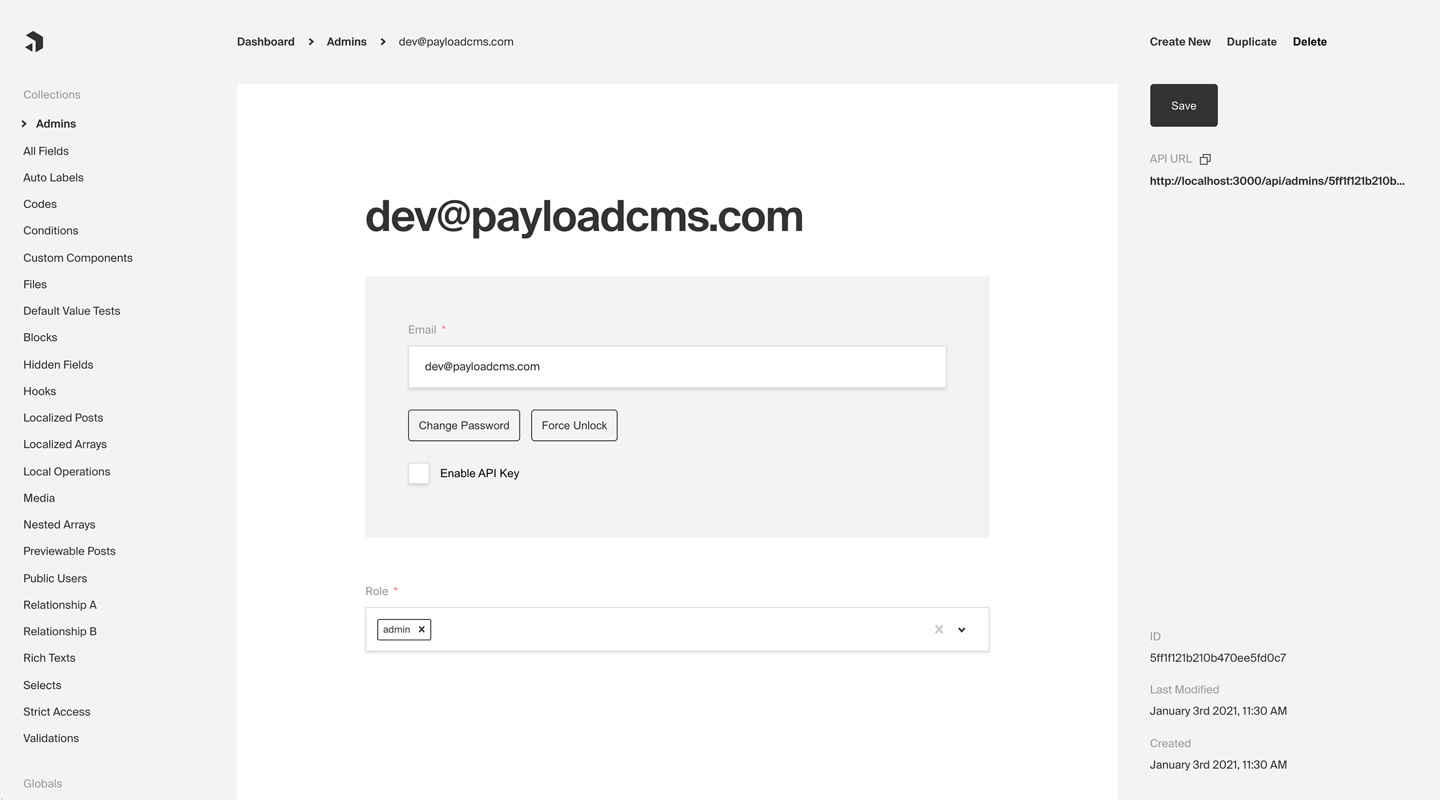
When Authentication is enabled on a [Collection](../configuration/collections), Payload injects all necessary functionality to support the entire user flow. This includes all [auth-related operations](./operations) like account creation, logging in and out, and resetting passwords, all [auth-related emails](./email) like email verification and password reset, as well as any necessary UI to manage users from the Admin Panel.
|
|
|
|
To enable Authentication on a Collection, use the `auth` property in the [Collection Config](../configuration/collection#auth):
|
|
|
|
```ts
|
|
import { CollectionConfig } from 'payload'
|
|
|
|
export const Users: CollectionConfig = {
|
|
// ...
|
|
auth: true, // highlight-line
|
|
}
|
|
```
|
|
|
|
|
|
_Admin Panel screenshot depicting an Admins Collection with Auth enabled_
|
|
|
|
## Config Options
|
|
|
|
Any [Collection](../configuration/collections) can opt-in to supporting Authentication. Once enabled, each Document that is created within the Collection can be thought of as a "user". This enables a complete authentication workflow on your Collection, such as logging in and out, resetting their password, and more.
|
|
|
|
<Banner type="warning">
|
|
<strong>Note:</strong>
|
|
By default, Payload provides an auth-enabled `User` Collection which is used to access the Admin Panel. [More details](../admin/overview#the-admin-user-collection).
|
|
</Banner>
|
|
|
|
To enable Authentication on a Collection, use the `auth` property in the [Collection Config](../configuration/collections):
|
|
|
|
```ts
|
|
import { CollectionConfig } from 'payload'
|
|
|
|
export const Admins: CollectionConfig = {
|
|
// ...
|
|
// highlight-start
|
|
auth: {
|
|
tokenExpiration: 7200, // How many seconds to keep the user logged in
|
|
verify: true, // Require email verification before being allowed to authenticate
|
|
maxLoginAttempts: 5, // Automatically lock a user out after X amount of failed logins
|
|
lockTime: 600 * 1000, // Time period to allow the max login attempts
|
|
// More options are available
|
|
},
|
|
// highlight-end
|
|
}
|
|
```
|
|
|
|
<Banner type="info">
|
|
<strong>Tip:</strong>
|
|
For default auth behavior, set `auth: true`. This is a good starting point for most applications.
|
|
</Banner>
|
|
|
|
<Banner type="warning">
|
|
<strong>Note:</strong>
|
|
Auth-enabled Collections with be automatically injected with the `hash`, `salt`, and `email` fields. [More details](../fields/overview#field-names).
|
|
</Banner>
|
|
|
|
The following options are available:
|
|
|
|
| Option | Description |
|
|
|----------------------------|-------------------------------------------------------------------------------------------------------------------------------------------------------------------------------------------------------------------------------------|
|
|
| **`cookies`** | Set cookie options, including `secure`, `sameSite`, and `domain`. For advanced users. |
|
|
| **`depth`** | How many levels deep a `user` document should be populated when creating the JWT and binding the `user` to the `req`. Defaults to `0` and should only be modified if absolutely necessary, as this will affect performance. |
|
|
| **`disableLocalStrategy`** | Advanced - disable Payload's built-in local auth strategy. Only use this property if you have replaced Payload's auth mechanisms with your own. |
|
|
| **`forgotPassword`** | Customize the way that the `forgotPassword` operation functions. [More details](./email#forgot-password). |
|
|
| **`lockTime`** | Set the time (in milliseconds) that a user should be locked out if they fail authentication more times than `maxLoginAttempts` allows for. |
|
|
| **`maxLoginAttempts`** | Only allow a user to attempt logging in X amount of times. Automatically locks out a user from authenticating if this limit is passed. Set to `0` to disable. |
|
|
| **`strategies`** | Advanced - an array of custom authentification strategies to extend this collection's authentication with. [More details](./custom-strategies). |
|
|
| **`tokenExpiration`** | How long (in seconds) to keep the user logged in. JWTs and HTTP-only cookies will both expire at the same time. |
|
|
| **`useAPIKey`** | Payload Authentication provides for API keys to be set on each user within an Authentication-enabled Collection. [More details](./api-keys). |
|
|
| **`verify`** | Set to `true` or pass an object with verification options to require users to verify by email before they are allowed to log into your app. [More details](./email#email-verification). |
|
|
|
|
## Admin Auto-Login
|
|
|
|
For testing and demo purposes you may want to skip forcing the admin user to login in order to access the [Admin Panel](../admin/overview). Typically, all users should be required to login to access the Admin Panel, however, you can speed up local development time by enabling auto-login.
|
|
|
|
To enable auto-login, set the `autoLogin` property in the [Admin Config](../configuration/admin):
|
|
|
|
```ts
|
|
import { buildConfig } from 'payload/config'
|
|
|
|
export default buildConfig({
|
|
// ...
|
|
admin: {
|
|
// ...
|
|
// highlight-start
|
|
autoLogin:
|
|
process.env.NEXT_PUBLIC_ENABLE_AUTOLOGIN === 'true'
|
|
? {
|
|
email: 'test@example.com',
|
|
password: 'test',
|
|
prefillOnly: true,
|
|
}
|
|
: false,
|
|
// highlight-end
|
|
},
|
|
})
|
|
```
|
|
|
|
<Banner type="warning">
|
|
<strong>Warning:</strong>
|
|
The recommended way to use this feature is behind an [Environment Variable](../configuration/environment-vars). This will ensure it is _disabled_ in production.
|
|
</Banner>
|
|
|
|
The following options are available:
|
|
|
|
| Option | Description |
|
|
| ----------------- | --------------------------------------------------------------------------------------------------------------- |
|
|
| **`email`** | The email address of the user to login as |
|
|
| **`password`** | The password of the user to login as |
|
|
| **`prefillOnly`** | If set to true, the login credentials will be prefilled but the user will still need to click the login button. |
|
|
|
|
## Operations
|
|
|
|
All auth-related operations are available via Payload's REST, Local, and GraphQL APIs. These operations are automatically added to your Collection when you enable Authentication. [More details](./operations).
|
|
|
|
## Strategies
|
|
|
|
Out of the box Payload ships with a three powerful Authentication strategies:
|
|
|
|
- [HTTP-Only Cookies](./cookies)
|
|
- [JSON Web Tokens (JWT)](./jwt)
|
|
- [API-Keys](./api-keys)
|
|
|
|
Each of these strategies can work together or independently. You can also create your own custom strategies to fit your specific needs. [More details](./custom-strategies).
|
|
|
|
### HTTP-Only Cookies
|
|
|
|
[HTTP-only cookies](https://developer.mozilla.org/en-US/docs/Web/HTTP/Cookies) are a highly secure method of storing identifiable data on a user's device so that Payload can automatically recognize a returning user until their cookie expires. They are totally protected from common XSS attacks and <strong>cannot be read by JavaScript in the browser</strong>, unlike JWT's. [More details](./cookies).
|
|
|
|
### JSON Web Tokens
|
|
|
|
JWT (JSON Web Tokens) can also be utilized to perform authentication. Tokens are generated on `login`, `refresh` and `me` operations and can be attached to future requests to authenticate users. [More details](./jwt).
|
|
|
|
### API Keys
|
|
|
|
API Keys can be enabled on auth collections. These are particularly useful when you want to authenticate against Payload from a third party service. [More details](./api-keys).
|
|
|
|
### Custom Strategies
|
|
|
|
There are cases where these may not be enough for your application. Payload is extendable by design so you can wire up your own strategy when you need to. [More details](./custom-strategies).
|