
298 lines
10 KiB
Plaintext
298 lines
10 KiB
Plaintext
---
|
|
description: Manage SEO metadata from your Payload admin
|
|
keywords: plugins, seo, meta, search, engine, ranking, google
|
|
label: SEO
|
|
order: 30
|
|
title: SEO Plugin
|
|
---
|
|
|
|

|
|
|
|
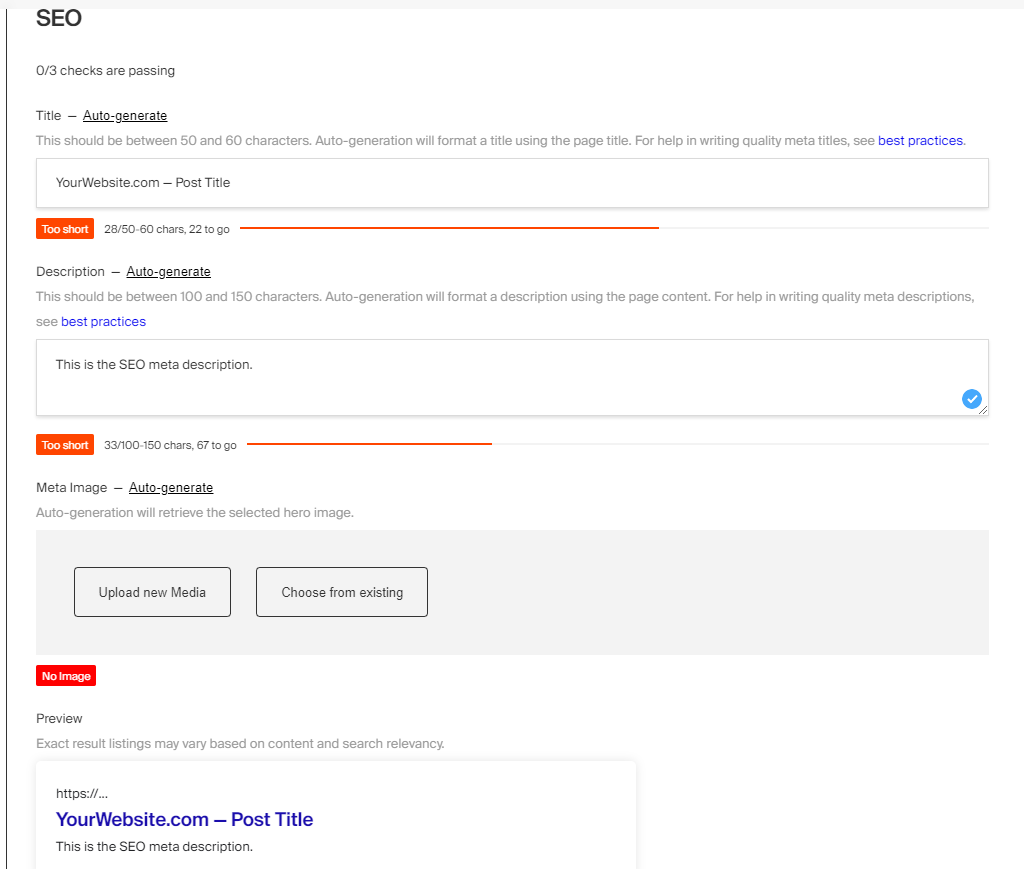
This plugin allows you to easily manage SEO metadata for your application from within your [Admin Panel](../admin/overview). When enabled on your [Collections](../configuration/collections) and [Globals](../configuration/globals), it adds a new `meta` field group containing `title`, `description`, and `image` by default. Your front-end application can then use this data to render meta tags however your application requires. For example, you would inject a `title` tag into the `<head>` of your page using `meta.title` as its content.
|
|
|
|
As users are editing documents within the Admin Panel, they have the option to "auto-generate" these fields. When clicked, this plugin will execute your own custom functions that re-generate the title, description, and image. This way you can build your own SEO writing assistance directly into your application. For example, you could append your site name onto the page title, or use the document's excerpt field as the description, or even integrate with some third-party API to generate the image using AI.
|
|
|
|
To help you visualize what your page might look like in a search engine, a preview is rendered on the page just beneath the meta fields. This preview is updated in real-time as you edit your metadata. There are also visual indicators to help you write effective meta, such as a character counter for the title and description fields. You can even inject your own custom fields into the `meta` field group as your application requires, like `og:title` or `json-ld`. If you've ever used something like Yoast SEO, this plugin might feel very familiar.
|
|
|
|
<Banner type="info">
|
|
This plugin is completely open-source and the [source code can be found here](https://github.com/payloadcms/payload/tree/main/packages/plugin-seo). If you need help, check out our [Community Help](https://payloadcms.com/community-help). If you think you've found a bug, please [open a new issue](https://github.com/payloadcms/payload/issues/new?assignees=&labels=plugin%3A%20seo&template=bug_report.md&title=plugin-seo%3A) with as much detail as possible.
|
|
</Banner>
|
|
|
|
## Core features
|
|
|
|
- Adds a `meta` field group to every SEO-enabled collection or global
|
|
- Allows you to define custom functions to auto-generate metadata
|
|
- Displays hints and indicators to help content editor write effective meta
|
|
- Renders a snippet of what a search engine might display
|
|
- Extendable so you can define custom fields like `og:title` or `json-ld`
|
|
- Soon will support dynamic variable injection
|
|
|
|
## Installation
|
|
|
|
Install the plugin using any JavaScript package manager like [pnpm](https://pnpm.io), [npm](https://npmjs.com), or [Yarn](https://yarnpkg.com):
|
|
|
|
```bash
|
|
pnpm add @payloadcms/plugin-seo
|
|
```
|
|
|
|
## Basic Usage
|
|
|
|
In the `plugins` array of your [Payload Config](../configuration/overview), call the plugin with [options](#options):
|
|
|
|
```ts
|
|
import { buildConfig } from 'payload';
|
|
import { seoPlugin } from '@payloadcms/plugin-seo';
|
|
|
|
const config = buildConfig({
|
|
collections: [
|
|
{
|
|
slug: 'pages',
|
|
fields: []
|
|
},
|
|
{
|
|
slug: 'media',
|
|
upload: {
|
|
staticDir: // path to your static directory,
|
|
},
|
|
fields: []
|
|
}
|
|
],
|
|
plugins: [
|
|
seoPlugin({
|
|
collections: [
|
|
'pages',
|
|
],
|
|
uploadsCollection: 'media',
|
|
generateTitle: ({ doc }) => `Website.com — ${doc.title}`,
|
|
generateDescription: ({ doc }) => doc.excerpt
|
|
})
|
|
]
|
|
});
|
|
|
|
export default config;
|
|
```
|
|
|
|
### Options
|
|
|
|
##### `collections`
|
|
|
|
An array of collections slugs to enable SEO. Enabled collections receive a `meta` field which is an object of title, description, and image subfields.
|
|
|
|
##### `globals`
|
|
|
|
An array of global slugs to enable SEO. Enabled globals receive a `meta` field which is an object of title, description, and image subfields.
|
|
|
|
##### `fields`
|
|
|
|
A function that takes in the default fields via an object and expects an array of fields in return. You can use this to modify existing fields or add new ones.
|
|
|
|
```ts
|
|
// payload.config.ts
|
|
{
|
|
// ...
|
|
seoPlugin({
|
|
fields: ({ defaultFields }) => [
|
|
...defaultFields,
|
|
{
|
|
name: 'customField',
|
|
type: 'text',
|
|
}
|
|
]
|
|
})
|
|
}
|
|
```
|
|
|
|
##### `uploadsCollection`
|
|
|
|
Set the `uploadsCollection` to your application's upload-enabled collection slug. This is used to provide an `image` field on the `meta` field group.
|
|
|
|
##### `tabbedUI`
|
|
|
|
When the `tabbedUI` property is `true`, it appends an `SEO` tab onto your config using Payload's [Tabs Field](../fields/tabs). If your collection is not already tab-enabled, meaning the first field in your config is not of type `tabs`, then one will be created for you called `Content`. Defaults to `false`.
|
|
|
|
<Banner type="info">
|
|
If you wish to continue to use top-level or sidebar fields with `tabbedUI`, you must not let the default `Content` tab get created for you (see the note above). Instead, you must define the first field of your config with type `tabs` and place all other fields adjacent to this one.
|
|
</Banner>
|
|
|
|
##### `generateTitle`
|
|
|
|
A function that allows you to return any meta title, including from the document's content.
|
|
|
|
```ts
|
|
// payload.config.ts
|
|
{
|
|
// ...
|
|
seoPlugin({
|
|
generateTitle: ({ doc }) => `Website.com — ${doc?.title}`,
|
|
})
|
|
}
|
|
```
|
|
|
|
All "generate" functions receive the following arguments:
|
|
|
|
| Argument | Description |
|
|
| --- | --- |
|
|
| **`collectionConfig`** | The configuration of the collection. |
|
|
| **`collectionSlug`** | The slug of the collection. |
|
|
| **`doc`** | The data of the current document. |
|
|
| **`docPermissions`** | The permissions of the document. |
|
|
| **`globalConfig`** | The configuration of the global. |
|
|
| **`globalSlug`** | The slug of the global. |
|
|
| **`hasPublishPermission`** | Whether the user has permission to publish the document. |
|
|
| **`hasSavePermission`** | Whether the user has permission to save the document. |
|
|
| **`id`** | The ID of the document. |
|
|
| **`initialData`** | The initial data of the document. |
|
|
| **`initialState`** | The initial state of the document. |
|
|
| **`locale`** | The locale of the document. |
|
|
| **`preferencesKey`** | The preferences key of the document. |
|
|
| **`publishedDoc`** | The published document. |
|
|
| **`req`** | The Payload request object containing `user`, `payload`, `i18n`, etc. |
|
|
| **`title`** | The title of the document. |
|
|
| **`versionsCount`** | The number of versions of the document. |
|
|
|
|
##### `generateDescription`
|
|
|
|
A function that allows you to return any meta description, including from the document's content.
|
|
|
|
```ts
|
|
// payload.config.ts
|
|
{
|
|
// ...
|
|
seoPlugin({
|
|
generateDescription: ({ doc }) => doc?.excerpt,
|
|
})
|
|
}
|
|
```
|
|
|
|
For a full list of arguments, see the [`generateTitle`](#generatetitle) function.
|
|
|
|
##### `generateImage`
|
|
|
|
A function that allows you to return any meta image, including from the document's content.
|
|
|
|
```ts
|
|
// payload.config.ts
|
|
{
|
|
// ...
|
|
seoPlugin({
|
|
generateImage: ({ doc }) => doc?.featuredImage,
|
|
})
|
|
}
|
|
```
|
|
|
|
For a full list of arguments, see the [`generateTitle`](#generatetitle) function.
|
|
|
|
##### `generateURL`
|
|
|
|
A function called by the search preview component to display the actual URL of your page.
|
|
|
|
```ts
|
|
// payload.config.ts
|
|
{
|
|
// ...
|
|
seoPlugin({
|
|
generateURL: ({ doc, collectionSlug }) =>
|
|
`https://yoursite.com/${collectionSlug}/${doc?.slug}`,
|
|
})
|
|
}
|
|
```
|
|
|
|
For a full list of arguments, see the [`generateTitle`](#generatetitle) function.
|
|
|
|
#### `interfaceName`
|
|
|
|
Rename the meta group interface name that is generated for TypeScript and GraphQL.
|
|
|
|
```ts
|
|
// payload.config.ts
|
|
{
|
|
// ...
|
|
seoPlugin({
|
|
interfaceName: 'customInterfaceNameSEO',
|
|
})
|
|
}
|
|
```
|
|
|
|
## Direct use of fields
|
|
|
|
There is the option to directly import any of the fields from the plugin so that you can include them anywhere as needed.
|
|
|
|
<Banner type="info">
|
|
You will still need to configure the plugin in the Payload Config in order to configure the generation functions. Since these fields are imported and used directly, they don't have access to the plugin config so they may need additional arguments to work the same way.
|
|
</Banner>
|
|
|
|
```ts
|
|
import { MetaDescriptionField, MetaImageField, MetaTitleField, OverviewField, PreviewField } from '@payloadcms/plugin-seo/fields'
|
|
|
|
// Used as fields
|
|
MetaImageField({
|
|
// the upload collection slug
|
|
relationTo: 'media',
|
|
|
|
// if the `generateImage` function is configured
|
|
hasGenerateFn: true,
|
|
})
|
|
|
|
MetaDescriptionField({
|
|
// if the `generateDescription` function is configured
|
|
hasGenerateFn: true,
|
|
})
|
|
|
|
MetaTitleField({
|
|
// if the `generateTitle` function is configured
|
|
hasGenerateFn: true,
|
|
})
|
|
|
|
PreviewField({
|
|
// if the `generateUrl` function is configured
|
|
hasGenerateFn: true,
|
|
|
|
// field paths to match the target field for data
|
|
titlePath: 'meta.title',
|
|
descriptionPath: 'meta.description',
|
|
})
|
|
|
|
OverviewField({
|
|
// field paths to match the target field for data
|
|
titlePath: 'meta.title',
|
|
descriptionPath: 'meta.description',
|
|
imagePath: 'meta.image',
|
|
})
|
|
```
|
|
|
|
<Banner type="info">
|
|
Tip: You can override the length rules by changing the minLength and maxLength props on the fields. In the case of the OverviewField you can use `titleOverrides` and `descriptionOverrides` to override the length rules.
|
|
</Banner>
|
|
|
|
## TypeScript
|
|
|
|
All types can be directly imported:
|
|
|
|
```ts
|
|
import type {
|
|
PluginConfig,
|
|
GenerateTitle,
|
|
GenerateDescription
|
|
GenerateURL
|
|
} from '@payloadcms/plugin-seo/types';
|
|
```
|
|
|
|
You can then pass the collections from your generated Payload types into the generation types, for example:
|
|
|
|
```ts
|
|
import type { Page } from './payload-types.ts';
|
|
|
|
import type { GenerateTitle } from '@payloadcms/plugin-seo/types';
|
|
|
|
const generateTitle: GenerateTitle<Page> = async ({ doc, locale }) => {
|
|
return `Website.com — ${doc?.title}`
|
|
}
|
|
```
|
|
|
|
## Examples
|
|
|
|
The [Templates Directory](https://github.com/payloadcms/payload/tree/main/templates) contains an official [Website Template](https://github.com/payloadcms/payload/tree/main/templates/website) and [E-commerce Template](https://github.com/payloadcms/payload/tree/main/templates/ecommere) which demonstrates exactly how to configure this plugin in Payload and implement it on your front-end.
|
|
|
|
## Screenshots
|
|
|
|
 |