
471 lines
22 KiB
Plaintext
471 lines
22 KiB
Plaintext
---
|
|
title: Form Builder Plugin
|
|
label: Form Builder
|
|
order: 40
|
|
desc: Easily build and manage forms from the Admin Panel. Send dynamic, personalized emails and even accept and process payments.
|
|
keywords: plugins, plugin, form, forms, form builder
|
|
---
|
|
|
|
[](https://www.npmjs.com/package/@payloadcms/plugin-form-builder)
|
|
|
|
This plugin allows you to build and manage custom forms directly within the [Admin Panel](../admin/overview). Instead of hard-coding a new form into your website or application every time you need one, admins can simply define the schema for each form they need on-the-fly, and your front-end can map over this schema, render its own UI components, and match your brand's design system.
|
|
|
|
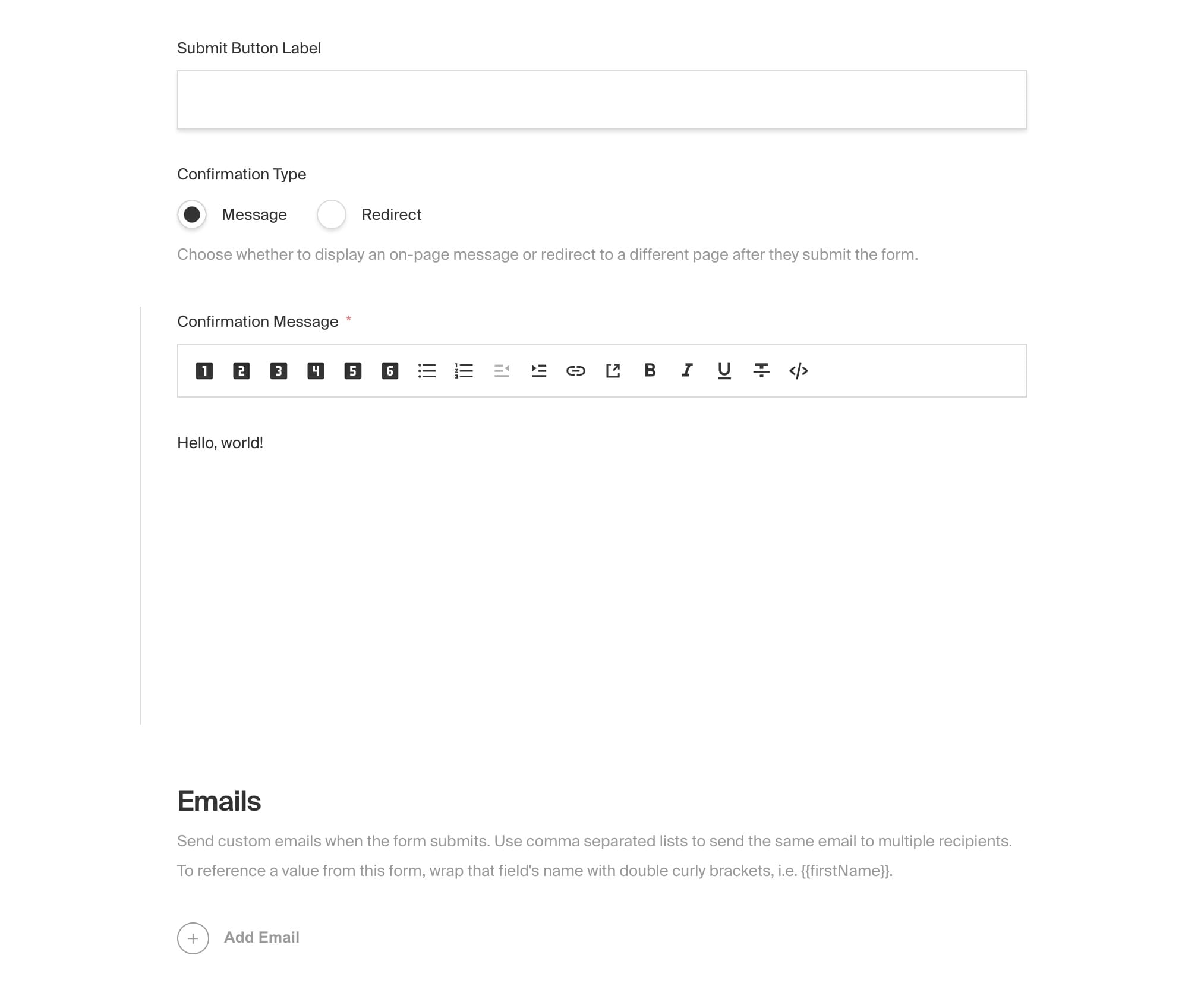
All form submissions are stored directly in your database and are managed directly from the Admin Panel. When forms are submitted, you can display a custom on-screen confirmation message to the user or redirect them to a dedicated confirmation page. You can even send dynamic, personalized emails derived from the form's data. For example, you may want to send a confirmation email to the user who submitted the form, and also send a notification email to your team.
|
|
|
|
Forms can be as simple or complex as you need, from a basic contact form, to a multi-step lead generation engine, or even a donation form that processes payment. You may not need to reach for third-party services like HubSpot or Mailchimp for this, but instead use your own first-party tooling, built directly into your own application.
|
|
|
|
<Banner type="info">
|
|
This plugin is completely open-source and the [source code can be found
|
|
here](https://github.com/payloadcms/payload/tree/main/packages/plugin-form-builder). If you need
|
|
help, check out our [Community Help](https://payloadcms.com/community-help). If you think you've
|
|
found a bug, please [open a new
|
|
issue](https://github.com/payloadcms/payload/issues/new?assignees=&labels=plugin%3A%20form-builder&template=bug_report.md&title=plugin-form-builder%3A)
|
|
with as much detail as possible.
|
|
</Banner>
|
|
|
|
## Core Features
|
|
|
|
- Build completely dynamic forms directly from the Admin Panel for a variety of use cases
|
|
- Render forms on your front-end using your own UI components and match your brand's design system
|
|
- Send dynamic, personalized emails upon form submission to multiple recipients, derived from the form's data
|
|
- Display a custom confirmation message or automatically redirect upon form submission
|
|
- Build dynamic prices based on form input to use for payment processing (optional)
|
|
|
|
## Installation
|
|
|
|
Install the plugin using any JavaScript package manager like [Yarn](https://yarnpkg.com), [NPM](https://npmjs.com), or [PNPM](https://pnpm.io):
|
|
|
|
```bash
|
|
pnpm add @payloadcms/plugin-form-builder
|
|
```
|
|
|
|
## Basic Usage
|
|
|
|
In the `plugins` array of your [Payload Config](https://payloadcms.com/docs/configuration/overview), call the plugin with [options](#options):
|
|
|
|
```ts
|
|
import { buildConfig } from 'payload'
|
|
import { formBuilderPlugin } from '@payloadcms/plugin-form-builder'
|
|
|
|
const config = buildConfig({
|
|
collections: [
|
|
{
|
|
slug: 'pages',
|
|
fields: [],
|
|
},
|
|
],
|
|
plugins: [
|
|
formBuilderPlugin({
|
|
// see below for a list of available options
|
|
}),
|
|
],
|
|
})
|
|
|
|
export default config
|
|
```
|
|
|
|
## Options
|
|
|
|
### `fields` (option)
|
|
|
|
The `fields` property is an object of field types to allow your admin editors to build forms with. To override default settings, pass either a boolean value or a partial [Payload Block](https://payloadcms.com/docs/fields/blocks#block-configs) _keyed to the block's slug_. See [Fields](#fields) for more details.
|
|
|
|
```ts
|
|
// payload.config.ts
|
|
formBuilder({
|
|
// ...
|
|
fields: {
|
|
text: true,
|
|
textarea: true,
|
|
select: true,
|
|
email: true,
|
|
state: true,
|
|
country: true,
|
|
checkbox: true,
|
|
number: true,
|
|
message: true,
|
|
payment: false,
|
|
},
|
|
})
|
|
```
|
|
|
|
### `redirectRelationships`
|
|
|
|
The `redirectRelationships` property is an array of collection slugs that, when enabled, are populated as options in the form's `redirect` field. This field is used to redirect the user to a dedicated confirmation page upon form submission (optional).
|
|
|
|
```ts
|
|
// payload.config.ts
|
|
formBuilder({
|
|
// ...
|
|
redirectRelationships: ['pages'],
|
|
})
|
|
```
|
|
|
|
### `beforeEmail`
|
|
|
|
The `beforeEmail` property is a [beforeChange](<[beforeChange](https://payloadcms.com/docs/hooks/globals#beforechange)>) hook that is called just after emails are prepared, but before they are sent. This is a great place to inject your own HTML template to add custom styles.
|
|
|
|
```ts
|
|
// payload.config.ts
|
|
formBuilder({
|
|
// ...
|
|
beforeEmail: (emailsToSend, beforeChangeParams) => {
|
|
// modify the emails in any way before they are sent
|
|
return emails.map((email) => ({
|
|
...email,
|
|
html: email.html, // transform the html in any way you'd like (maybe wrap it in an html template?)
|
|
}))
|
|
},
|
|
})
|
|
```
|
|
|
|
For full types with `beforeChangeParams`, you can import the types from the plugin:
|
|
|
|
```ts
|
|
import type { BeforeEmail } from '@payloadcms/plugin-form-builder'
|
|
// Your generated FormSubmission type
|
|
import type {FormSubmission} from '@payload-types'
|
|
|
|
// Pass it through and 'data' or 'originalDoc' will now be typed
|
|
const beforeEmail: BeforeEmail<FormSubmission> = (emailsToSend, beforeChangeParams) => {
|
|
// modify the emails in any way before they are sent
|
|
return emails.map((email) => ({
|
|
...email,
|
|
html: email.html, // transform the html in any way you'd like (maybe wrap it in an html template?)
|
|
}))
|
|
}
|
|
```
|
|
|
|
### `defaultToEmail`
|
|
|
|
Provide a fallback for the email address to send form submissions to. If the email in form configuration does not have a to email set, this email address will be used. If this is not provided then it falls back to the `defaultFromAddress` in your [email configuration](https://payloadcms.com/docs/beta/email/overview).
|
|
|
|
```ts
|
|
// payload.config.ts
|
|
formBuilder({
|
|
// ...
|
|
defaultToEmail: 'test@example.com',
|
|
})
|
|
```
|
|
|
|
### `formOverrides`
|
|
|
|
Override anything on the `forms` collection by sending a [Payload Collection Config](https://payloadcms.com/docs/configuration/collections) to the `formOverrides` property.
|
|
|
|
Note that the `fields` property is a function that receives the default fields and returns an array of fields. This is because the `fields` property is a special case that is merged with the default fields, rather than replacing them. This allows you to map over default fields and modify them as needed.
|
|
|
|
<Banner type="warning">
|
|
Good to know: The form collection is publicly available to read by default. The emails field is locked for authenticated users only. If you have any frontend users you should override the access permissions for both the collection and the emails field to make sure you don't leak out any private emails.
|
|
</Banner>
|
|
|
|
```ts
|
|
// payload.config.ts
|
|
formBuilder({
|
|
// ...
|
|
formOverrides: {
|
|
slug: 'contact-forms',
|
|
access: {
|
|
read: ({ req: { user } }) => !!user, // authenticated users only
|
|
update: () => false,
|
|
},
|
|
fields: ({ defaultFields }) => {
|
|
return [
|
|
...defaultFields,
|
|
{
|
|
name: 'custom',
|
|
type: 'text',
|
|
},
|
|
]
|
|
},
|
|
},
|
|
})
|
|
```
|
|
|
|
### `formSubmissionOverrides`
|
|
|
|
Override anything on the `form-submissions` collection by sending a [Payload Collection Config](https://payloadcms.com/docs/configuration/collections) to the `formSubmissionOverrides` property.
|
|
|
|
<Banner type="warning">
|
|
By default, this plugin relies on [Payload access
|
|
control](https://payloadcms.com/docs/access-control/collections) to restrict the `update` and
|
|
`read` operations on the `form-submissions` collection. This is because _anyone_ should be able to
|
|
create a form submission, even from a public-facing website, but _no one_ should be able to update
|
|
a submission once it has been created, or read a submission unless they have permission. You can
|
|
override this behavior or any other property as needed.
|
|
</Banner>
|
|
|
|
```ts
|
|
// payload.config.ts
|
|
formBuilder({
|
|
// ...
|
|
formSubmissionOverrides: {
|
|
slug: 'leads',
|
|
fields: ({ defaultFields }) => {
|
|
return [
|
|
...defaultFields,
|
|
{
|
|
name: 'custom',
|
|
type: 'text',
|
|
},
|
|
]
|
|
},
|
|
},
|
|
})
|
|
```
|
|
|
|
### `handlePayment`
|
|
|
|
The `handlePayment` property is a [beforeChange](<[beforeChange](https://payloadcms.com/docs/hooks/globals#beforechange)>) hook that is called upon form submission. You can integrate into any third-party payment processing API here to accept payment based on form input. You can use the `getPaymentTotal` function to calculate the total cost after all conditions have been applied. This is only applicable if the form has enabled the `payment` field.
|
|
|
|
First import the utility function. This will execute all of the price conditions that you have set in your form's `payment` field and returns the total price.
|
|
|
|
```ts
|
|
// payload.config.ts
|
|
import { getPaymentTotal } from '@payloadcms/plugin-form-builder'
|
|
```
|
|
|
|
Then in your plugin's config:
|
|
|
|
```ts
|
|
// payload.config.ts
|
|
formBuilder({
|
|
// ...
|
|
handlePayment: async ({ form, submissionData }) => {
|
|
// first calculate the price
|
|
const paymentField = form.fields?.find((field) => field.blockType === 'payment')
|
|
const price = getPaymentTotal({
|
|
basePrice: paymentField.basePrice,
|
|
priceConditions: paymentField.priceConditions,
|
|
fieldValues: submissionData,
|
|
})
|
|
// then asynchronously process the payment here
|
|
},
|
|
})
|
|
```
|
|
|
|
## Fields
|
|
|
|
Each field represents a form input. To override default settings pass either a boolean value or a partial [Payload Block](https://payloadcms.com/docs/fields/blocks) _keyed to the block's slug_. See [Field Overrides](#field-overrides) for more details on how to do this.
|
|
|
|
<Banner type="info">
|
|
<strong>Note:</strong>
|
|
"Fields" here is in reference to the _fields to build forms with_, not to be confused with the _fields
|
|
of a collection_ which are set via `formOverrides.fields`.
|
|
</Banner>
|
|
|
|
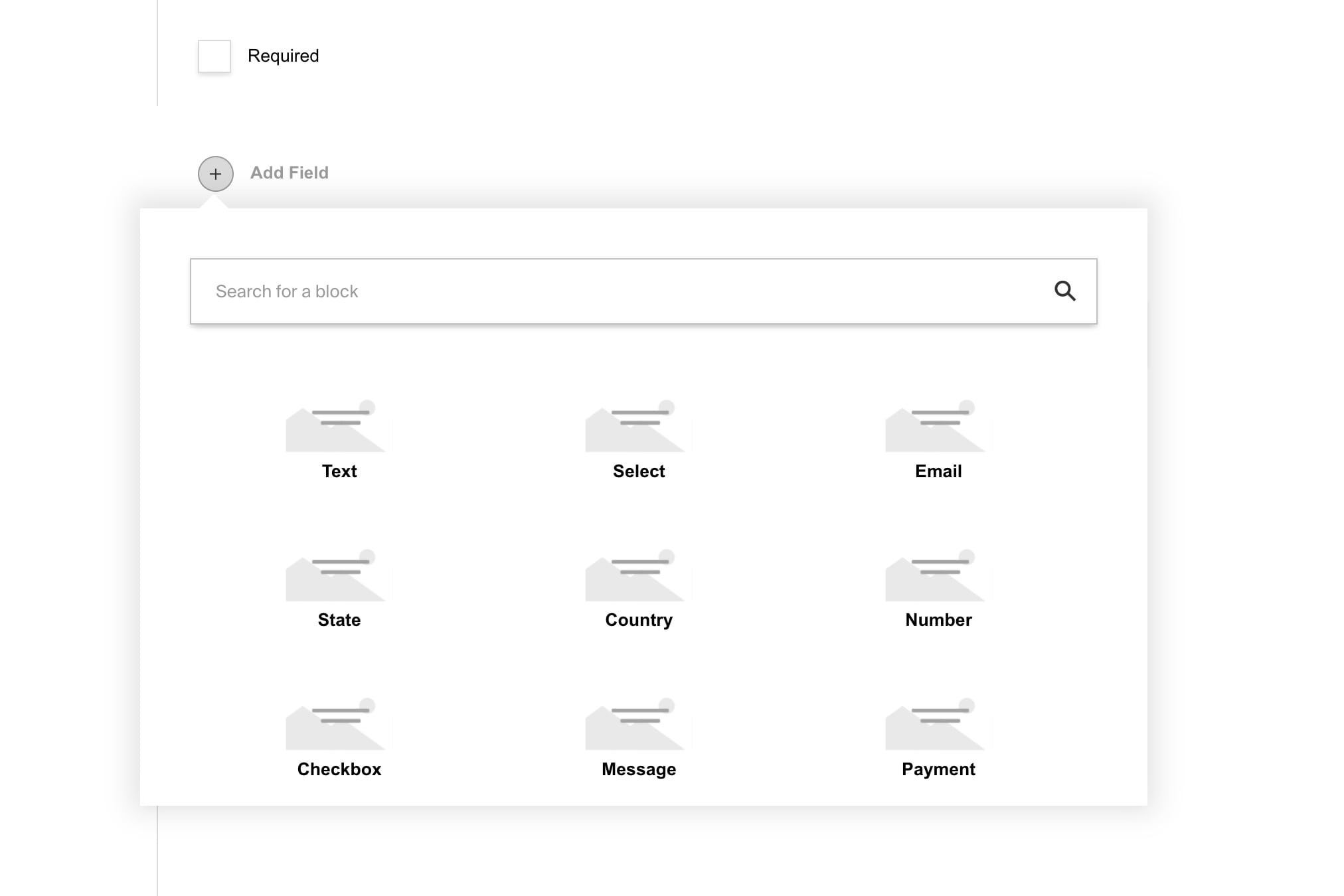
### Text
|
|
|
|
Maps to a `text` input in your front-end. Used to collect a simple string.
|
|
|
|
| Property | Type | Description |
|
|
| -------------- | -------- | ---------------------------------------------------- |
|
|
| `name` | string | The name of the field. |
|
|
| `label` | string | The label of the field. |
|
|
| `defaultValue` | string | The default value of the field. |
|
|
| `width` | string | The width of the field on the front-end. |
|
|
| `required` | checkbox | Whether or not the field is required when submitted. |
|
|
|
|
### Textarea
|
|
|
|
Maps to a `textarea` input on your front-end. Used to collect a multi-line string.
|
|
|
|
| Property | Type | Description |
|
|
| -------------- | -------- | ---------------------------------------------------- |
|
|
| `name` | string | The name of the field. |
|
|
| `label` | string | The label of the field. |
|
|
| `defaultValue` | string | The default value of the field. |
|
|
| `width` | string | The width of the field on the front-end. |
|
|
| `required` | checkbox | Whether or not the field is required when submitted. |
|
|
|
|
### Select
|
|
|
|
Maps to a `select` input on your front-end. Used to display a list of options.
|
|
|
|
| Property | Type | Description |
|
|
| -------------- | -------- | -------------------------------------------------------- |
|
|
| `name` | string | The name of the field. |
|
|
| `label` | string | The label of the field. |
|
|
| `defaultValue` | string | The default value of the field. |
|
|
| `width` | string | The width of the field on the front-end. |
|
|
| `required` | checkbox | Whether or not the field is required when submitted. |
|
|
| `options` | array | An array of objects with `label` and `value` properties. |
|
|
|
|
### Email (field)
|
|
|
|
Maps to a `text` input with type `email` on your front-end. Used to collect an email address.
|
|
|
|
| Property | Type | Description |
|
|
| -------------- | -------- | ---------------------------------------------------- |
|
|
| `name` | string | The name of the field. |
|
|
| `label` | string | The label of the field. |
|
|
| `defaultValue` | string | The default value of the field. |
|
|
| `width` | string | The width of the field on the front-end. |
|
|
| `required` | checkbox | Whether or not the field is required when submitted. |
|
|
|
|
### State
|
|
|
|
Maps to a `select` input on your front-end. Used to collect a US state.
|
|
|
|
| Property | Type | Description |
|
|
| -------------- | -------- | ---------------------------------------------------- |
|
|
| `name` | string | The name of the field. |
|
|
| `label` | string | The label of the field. |
|
|
| `defaultValue` | string | The default value of the field. |
|
|
| `width` | string | The width of the field on the front-end. |
|
|
| `required` | checkbox | Whether or not the field is required when submitted. |
|
|
|
|
### Country
|
|
|
|
Maps to a `select` input on your front-end. Used to collect a country.
|
|
|
|
| Property | Type | Description |
|
|
| -------------- | -------- | ---------------------------------------------------- |
|
|
| `name` | string | The name of the field. |
|
|
| `label` | string | The label of the field. |
|
|
| `defaultValue` | string | The default value of the field. |
|
|
| `width` | string | The width of the field on the front-end. |
|
|
| `required` | checkbox | Whether or not the field is required when submitted. |
|
|
|
|
### Checkbox
|
|
|
|
Maps to a `checkbox` input on your front-end. Used to collect a boolean value.
|
|
|
|
| Property | Type | Description |
|
|
| -------------- | -------- | ---------------------------------------------------- |
|
|
| `name` | string | The name of the field. |
|
|
| `label` | string | The label of the field. |
|
|
| `defaultValue` | checkbox | The default value of the field. |
|
|
| `width` | string | The width of the field on the front-end. |
|
|
| `required` | checkbox | Whether or not the field is required when submitted. |
|
|
|
|
### Number
|
|
|
|
Maps to a `number` input on your front-end. Used to collect a number.
|
|
|
|
| Property | Type | Description |
|
|
| -------------- | -------- | ---------------------------------------------------- | --- | -------------- | ------ | ------------------------------- |
|
|
| `name` | string | The name of the field. |
|
|
| `label` | string | The label of the field. |
|
|
| `defaultValue` | string | The default value of the field. |
|
|
| `width` | string | The width of the field on the front-end. |
|
|
| `required` | checkbox | Whether or not the field is required when submitted. | | `defaultValue` | number | The default value of the field. |
|
|
|
|
### Message
|
|
|
|
Maps to a `RichText` component on your front-end. Used to display an arbitrary message to the user anywhere in the form.
|
|
|
|
| property | type | description |
|
|
| --------- | -------- | ----------------------------------- |
|
|
| `message` | richText | The message to display on the form. |
|
|
|
|
### Payment
|
|
|
|
Add this field to your form if it should collect payment. Upon submission, the `handlePayment` callback is executed with the form and submission data. You can use this to integrate with any third-party payment processing API.
|
|
|
|
| property | type | description |
|
|
| ----------------- | -------- | --------------------------------------------------------------------------------- |
|
|
| `name` | string | The name of the field. |
|
|
| `label` | string | The label of the field. |
|
|
| `defaultValue` | number | The default value of the field. |
|
|
| `width` | string | The width of the field on the front-end. |
|
|
| `required` | checkbox | Whether or not the field is required when submitted. |
|
|
| `priceConditions` | array | An array of objects that define the price conditions. See below for more details. |
|
|
|
|
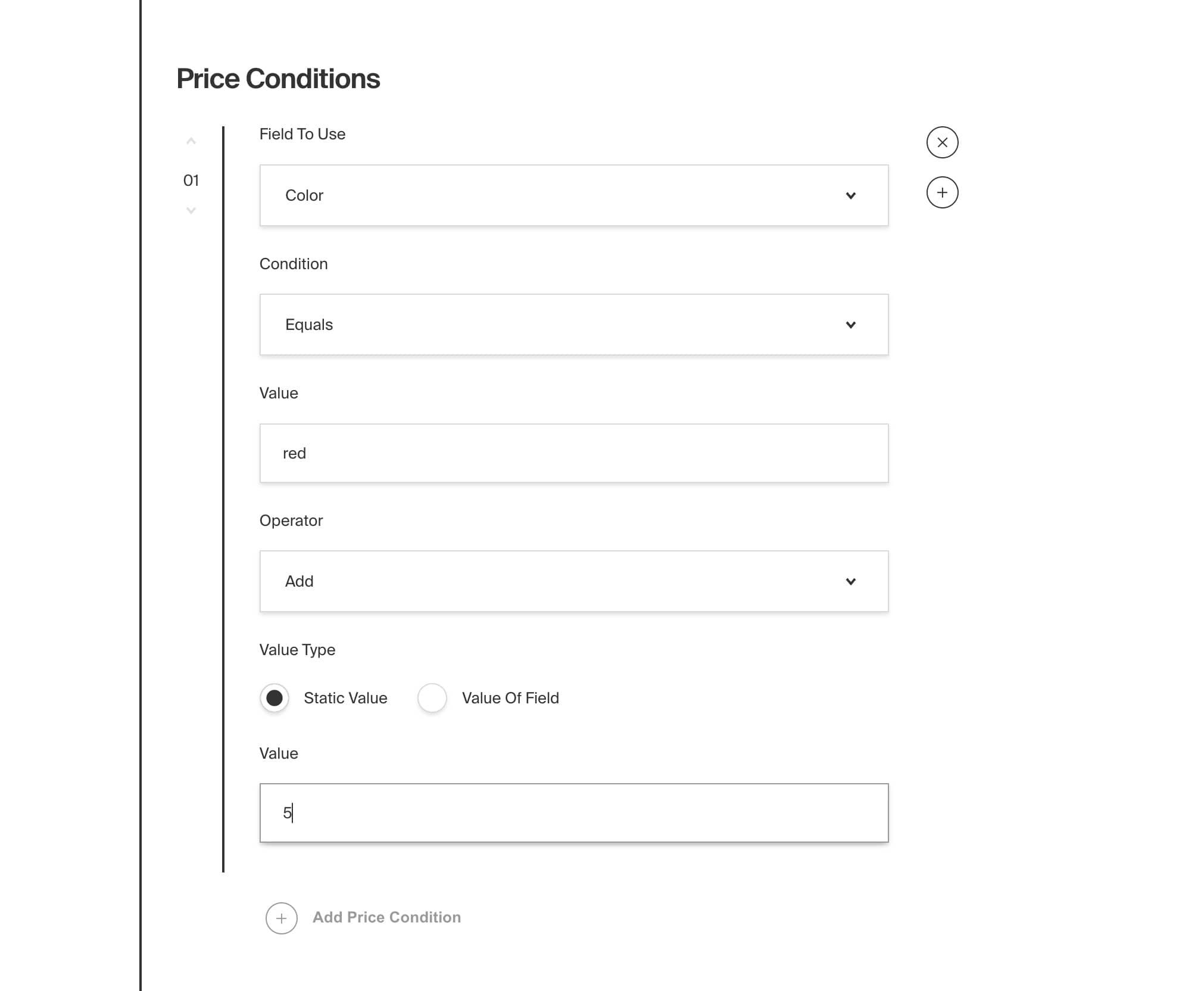
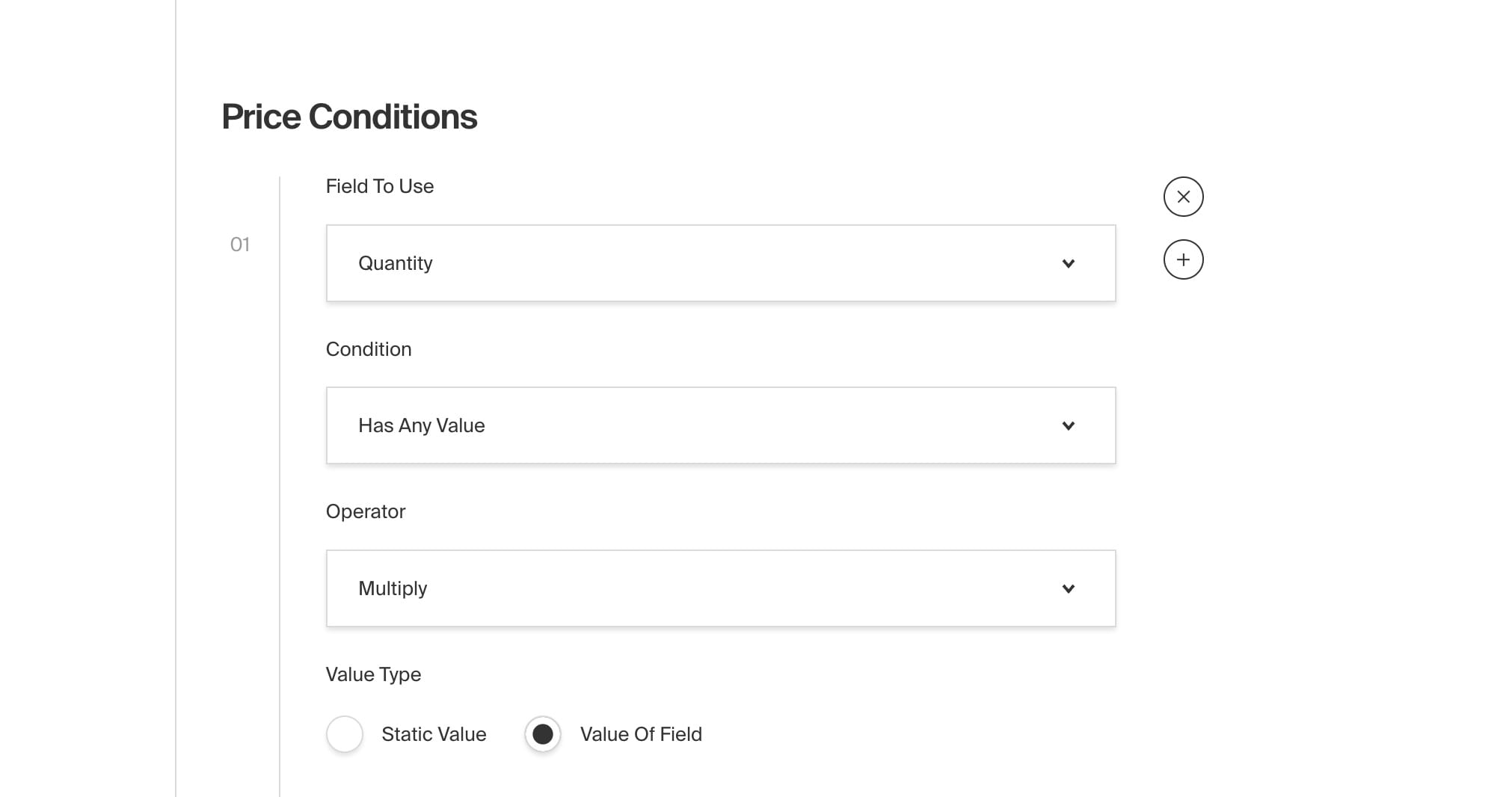
#### Price Conditions
|
|
|
|
Each of the `priceConditions` are executed by the `getPaymentTotal` utility that this plugin provides. You can call this function in your `handlePayment` callback to dynamically calculate the total price of a form upon submission based on the user's input. For example, you could create a price condition that says "if the user selects 'yes' for this checkbox, add $10 to the total price".
|
|
|
|
| property | type | description |
|
|
| ------------------ | ------------ | ------------------------------------------------ |
|
|
| `fieldToUse` | relationship | The field to use to determine the price. |
|
|
| `condition` | string | The condition to use to determine the price. |
|
|
| `valueForOperator` | string | The value to use for the operator. |
|
|
| `operator` | string | The operator to use to determine the price. |
|
|
| `valueType` | string | The type of value to use to determine the price. |
|
|
| `value` | string | The value to use to determine the price. |
|
|
|
|
### Field Overrides
|
|
|
|
You can provide your own custom fields by passing a new [Payload Block](https://payloadcms.com/docs/fields/blocks#block-configs) object into `fields`. You can override or extend any existing fields by first importing the `fields` from the plugin:
|
|
|
|
```ts
|
|
import { fields } from '@payloadcms/plugin-form-builder'
|
|
```
|
|
|
|
Then merging it into your own custom field:
|
|
|
|
```ts
|
|
// payload.config.ts
|
|
formBuilder({
|
|
// ...
|
|
fields: {
|
|
text: {
|
|
...fields.text,
|
|
labels: {
|
|
singular: 'Custom Text Field',
|
|
plural: 'Custom Text Fields',
|
|
},
|
|
},
|
|
},
|
|
})
|
|
```
|
|
|
|
## Email
|
|
|
|
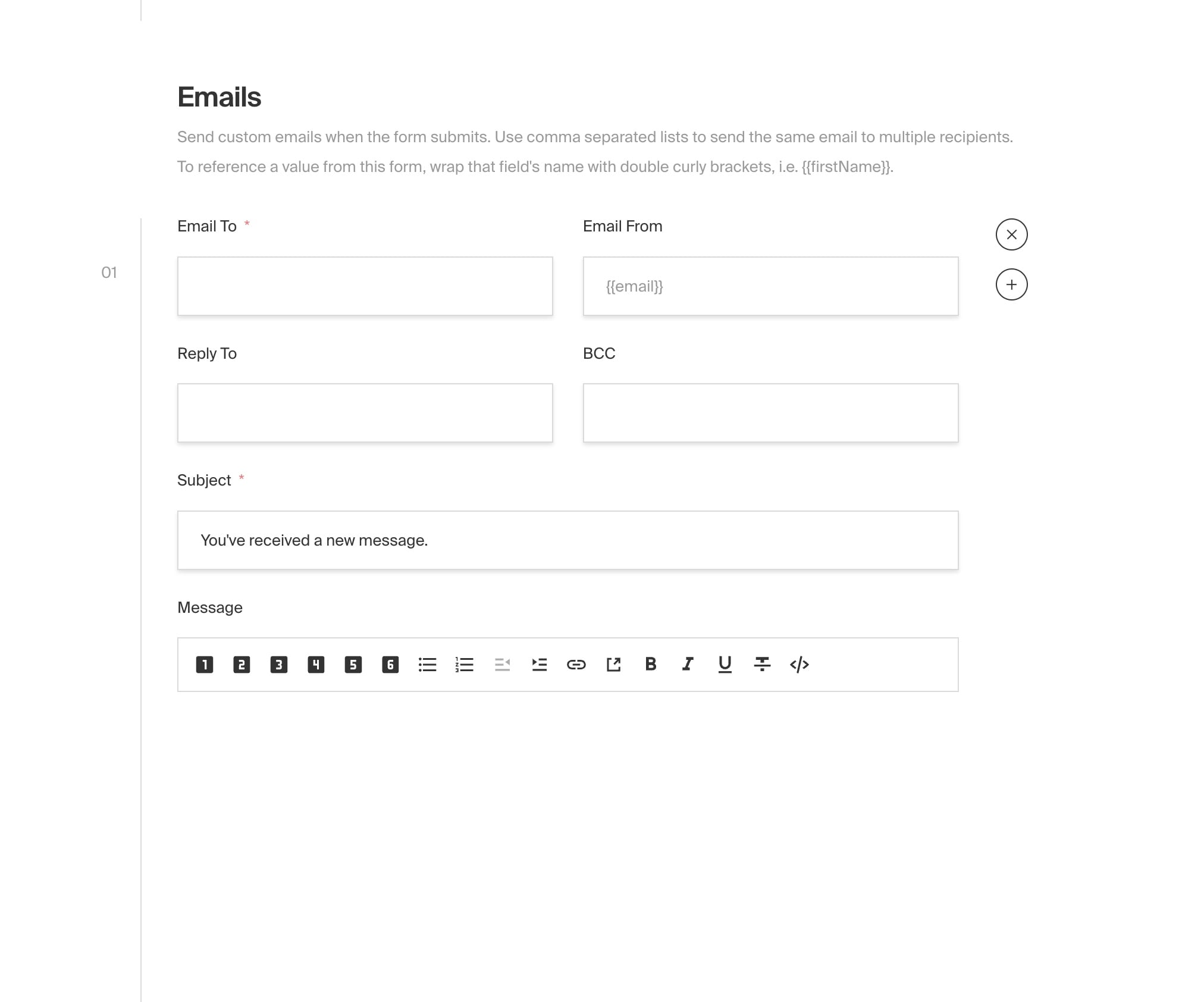
This plugin relies on the [email configuration](https://payloadcms.com/docs/beta/email/overview) defined in your payload configuration. It will read from your config and attempt to send your emails using the credentials provided.
|
|
|
|
### Email formatting
|
|
|
|
The email contents supports rich text which will be serialised to HTML on the server before being sent. By default it reads the global configuration of your rich text editor.
|
|
|
|
The email subject and body supports inserting dynamic fields from the form submission data using the `{{field_name}}` syntax. For example, if you have a field called `name` in your form, you can include this in the email body like so:
|
|
|
|
```html
|
|
Thank you for your submission, {{name}}!
|
|
```
|
|
|
|
You can also use `{{*}}` as a wildcard to output all the data in a key:value format and `{{*:table}}` to output all the data in a table format.
|
|
|
|
## TypeScript
|
|
|
|
All types can be directly imported:
|
|
|
|
```ts
|
|
import type {
|
|
PluginConfig,
|
|
Form,
|
|
FormSubmission,
|
|
FieldsConfig,
|
|
BeforeEmail,
|
|
HandlePayment,
|
|
...
|
|
} from "@payloadcms/plugin-form-builder/types";
|
|
```
|
|
|
|
## Examples
|
|
|
|
The [Examples Directory](https://github.com/payloadcms/payload/tree/main/examples) contains an official [Form Builder Plugin Example](https://github.com/payloadcms/payload/tree/main/examples/form-builder) which demonstrates exactly how to configure this plugin in Payload and implement it on your front-end. We've also included an in-depth walk-through of how to build a form from scratch in our [Form Builder Plugin Blog Post](https://payloadcms.com/blog/create-custom-forms-with-the-official-form-builder-plugin).
|
|
|
|
## Troubleshooting
|
|
|
|
Below are some common troubleshooting tips. To help other developers, please contribute to this section as you troubleshoot your own application.
|
|
|
|
#### SendGrid 403 Forbidden Error
|
|
|
|
- If you are using [SendGrid Link Branding](https://docs.sendgrid.com/ui/account-and-settings/how-to-set-up-link-branding) to remove the "via sendgrid.net" part of your email, you must also setup [Domain Authentication](https://docs.sendgrid.com/ui/account-and-settings/how-to-set-up-domain-authentication). This means you can only send emails from an address on this domain — so the `from` addresses in your form submission emails **_cannot_** be anything other than `something@your_domain.com`. This means that from `{{email}}` will not work, but `website@your_domain.com` will. You can still send the form's email address in the body of the email.
|
|
|
|
## Screenshots
|
|
|
|

|
|
|
|
<br />
|
|
|
|
<br />
|
|
|
|
<br />
|
|
|
|
<br />
|
|
|
|
<br />
|
|
|