 bb17cc3ea8
This PR removes the `packages/payload/src/assets` folder for the
following reasons:
- they were published to npm. Removing this decreases the install size
of payload (excluding dependencies) from 6.22MB => 5.12MB
- most assets were unused. The only used ones were moved to a different
directory that does not get published to npm

This also updates some outdated asset URLs in our examples
3.2 KiB
Reproduction Guide
- Fork this repo
- Optionally, create a new branch for your reproduction
- Run
pnpm installto install dependencies - Open up the
test/_communitydirectory - Add any necessary
collections/globals/fieldsin this directory to recreate the issue you are experiencing - Run
pnpm dev _communityto start the admin panel
NOTE: The goal is to isolate the problem by reducing the number of collections/globals/fields you add to the test/_community folder. This folder is not meant for you to copy your project into, but rather recreate the issue you are experiencing with minimal config.
Example test directory file tree
.
├── config.ts
├── int.spec.ts
├── e2e.spec.ts
└── payload-types.ts
config.ts- This is the granular Payload config for testing. It should be as lightweight as possible. Reference existing configs for an exampleint.spec.ts[Optional] - This is the test file run by jest. Any test file must have a*int.spec.tssuffix.e2e.spec.ts[Optional] - This is the end-to-end test file that will load up the admin UI using the above config and run Playwright tests.payload-types.ts- Generated types fromconfig.ts. Generate this file by runningpnpm dev:generate-types _community.
The directory split up in this way specifically to reduce friction when creating tests and to add the ability to boot up Payload with that specific config. You should modify the files in test/_community to get started.
Testing is optional but encouraged
An issue does not need to have failing tests — reproduction steps with your forked repo are enough at this point. Some people like to dive deeper and we want to give you the guidance/tools to do so. Read more below:
Running integration tests (Payload API tests)
First install Jest Runner for VSVode.
There are a couple ways run integration tests:
-
Granularly - you can run individual tests in vscode by installing the Jest Runner plugin and using that to run individual tests. Clicking the
debugbutton will run the test in debug mode allowing you to set break points.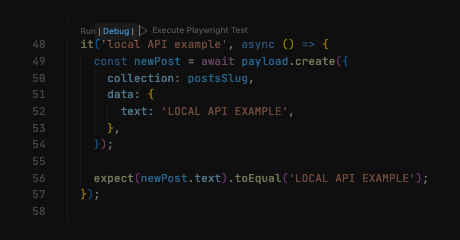
-
Manually - you can run all int tests in the
/test/_community/int.spec.tsfile by running the following command:pnpm test:int _community
Running E2E tests (Admin Panel UI tests)
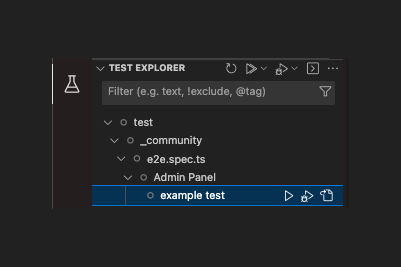
The easiest way to run E2E tests is to install
Once they are installed you can open the testing tab in vscode sidebar and drill down to the test you want to run, i.e. /test/_community/e2e.spec.ts
Notes
The default credentials are dev@payloadcms.com as email and test as password. They can be found in test/credentials.ts. By default, these will be autofilled, so no log-in is required.