 bab34d82f5
Co-authored-by: shikhantmaungs <shinkhantmaungs@gmail.com>
Co-authored-by: Thomas Ghysels <info@thomasg.be>
Co-authored-by: Kokutse Djoguenou <kokutse@Kokutses-MacBook-Pro.local>
Co-authored-by: Christian Gil <47041342+ChrisGV04@users.noreply.github.com>
Co-authored-by: Łukasz Rabiec <lukaszrabiec@gmail.com>
Co-authored-by: Jenny <jennifer.eberlei@gmail.com>
Co-authored-by: Hung Vu <hunghvu2017@gmail.com>
Co-authored-by: Shin Khant Maung <101539335+shinkhantmaungs@users.noreply.github.com>
Co-authored-by: Carlo Brualdi <carlo.brualdi@gmail.com>
Co-authored-by: Ariel Tonglet <ariel.tonglet@gmail.com>
Co-authored-by: Roman Ryzhikov <general+github@ya.ru>
Co-authored-by: maekoya <maekoya@stromatolite.jp>
Co-authored-by: Emilia Trollros <3m1l1a@emiliatrollros.se>
Co-authored-by: Kokutse J Djoguenou <90865585+Julesdj@users.noreply.github.com>
Co-authored-by: Mitch Dries <mitch.dries@gmail.com>

BREAKING CHANGE: If you assigned labels to collections, globals or block names, you need to update your config! Your GraphQL schema and generated Typescript interfaces may have changed. Payload no longer uses labels for code based naming. To prevent breaking changes to your GraphQL API and typescript types in your project, you can assign the below properties to match what Payload previously generated for you from labels.

On Collections
Use `graphQL.singularName`, `graphQL.pluralName` for GraphQL schema names.
Use `typescript.interface` for typescript generation name.

On Globals
Use `graphQL.name` for GraphQL Schema name.
Use `typescript.interface` for typescript generation name.

On Blocks (within Block fields)
Use `graphQL.singularName` for graphQL schema names.
98 lines
4.7 KiB
Plaintext
98 lines
4.7 KiB
Plaintext
---
|
|
title: Array Field
|
|
label: Array
|
|
order: 20
|
|
desc: Array fields are intended for sets of repeating fields, that you define. Learn how to use array fields, see examples and options.
|
|
keywords: array, fields, config, configuration, documentation, Content Management System, cms, headless, javascript, node, react, express
|
|
---
|
|
|
|
<Banner >
|
|
The Array field type is used when you need to have a set of "repeating" fields. It stores an array of objects containing the fields that you define. Its uses can be simple or highly complex.
|
|
</Banner>
|
|
|
|
**Example uses:**
|
|
|
|
- A "slider" with an image ([upload field](/docs/fields/upload)) and a caption ([text field](/docs/fields/text))
|
|
- Navigational structures where editors can specify nav items containing pages ([relationship field](/docs/fields/relationship)), an "open in new tab" [checkbox field](/docs/fields/checkbox)
|
|
- Event agenda "timeslots" where you need to specify start & end time ([date field](/docs/fields/date)), label ([text field](/docs/fields/text)), and Learn More page [relationship](/docs/fields/relationship)
|
|
|
|
|
|
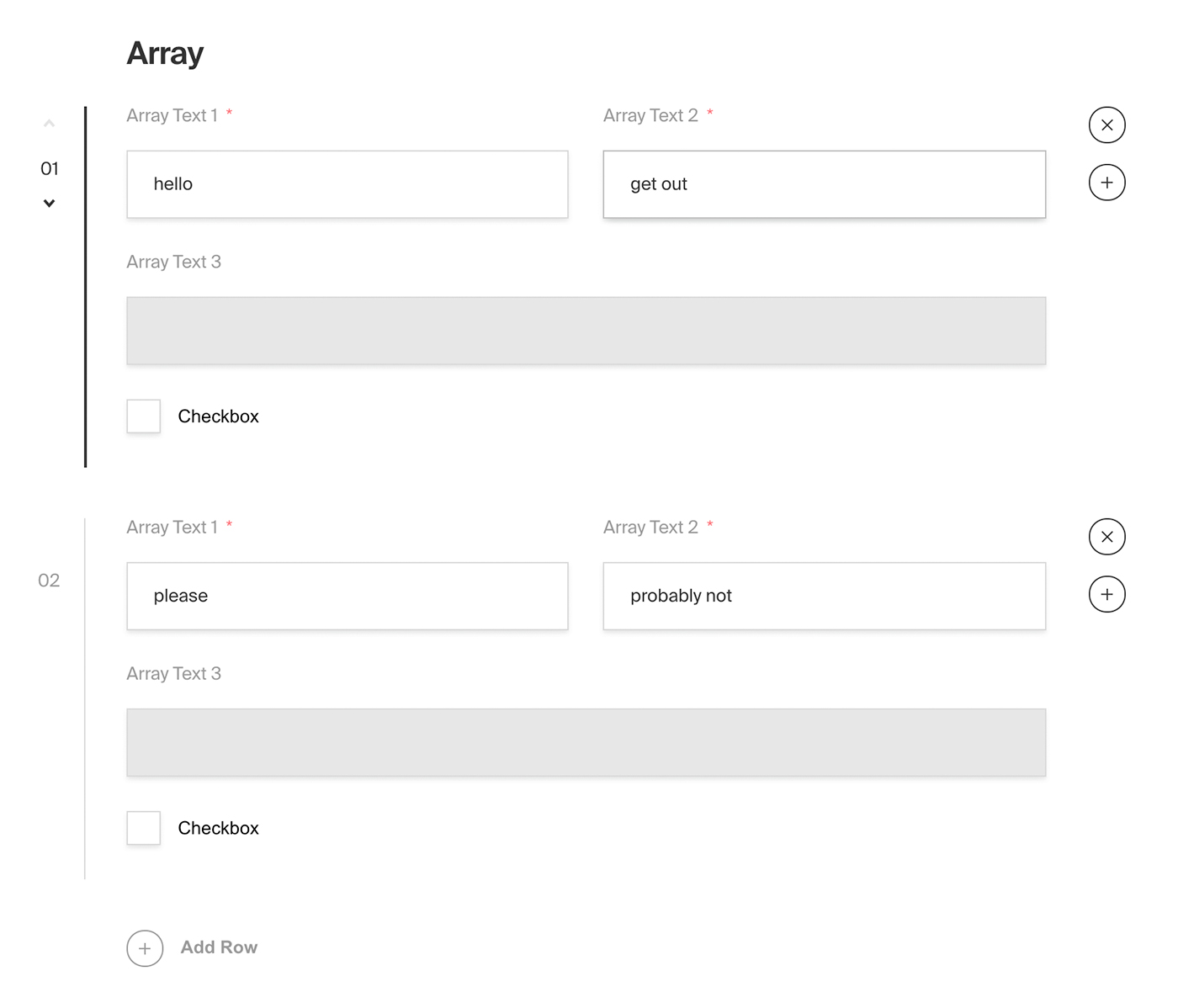
*Admin panel screenshot of an Array field with a Row containing two text fields, a read-only text field and a checkbox*
|
|
|
|
### Config
|
|
|
|
| Option | Description |
|
|
| ---------------- | ----------- |
|
|
| **`name`** * | To be used as the property name when stored and retrieved from the database. |
|
|
| **`label`** | Used as a heading in the Admin panel and to name the generated GraphQL type. Auto-generated from name if not defined. |
|
|
| **`fields`** * | Array of field types to correspond to each row of the Array. |
|
|
| **`validate`** | Provide a custom validation function that will be executed on both the Admin panel and the backend. [More](/docs/fields/overview#validation) |
|
|
| **`saveToJWT`** | If this field is top-level and nested in a config supporting [Authentication](/docs/authentication/config), include its data in the user JWT. |
|
|
| **`hooks`** | Provide field-based hooks to control logic for this field. [More](/docs/fields/overview#field-level-hooks) |
|
|
| **`access`** | Provide field-based access control to denote what users can see and do with this field's data. [More](/docs/fields/overview#field-level-access-control) |
|
|
| **`hidden`** | Restrict this field's visibility from all APIs entirely. Will still be saved to the database, but will not appear in any API or the Admin panel. |
|
|
| **`defaultValue`** | Provide an array of row data to be used for this field's default value. [More](/docs/fields/overview#default-values) |
|
|
| **`localized`** | Enable localization for this field. Requires [localization to be enabled](/docs/configuration/localization) in the Base config. If enabled, a separate, localized set of all data within this Array will be kept, so there is no need to specify each nested field as `localized`. |
|
|
| **`required`** | Require this field to have a value. |
|
|
| **`labels`** | Customize the row labels appearing in the Admin dashboard. |
|
|
| **`admin`** | Admin-specific configuration. See below for [more detail](#admin-config). |
|
|
|
|
*\* An asterisk denotes that a property is required.*
|
|
|
|
### Admin Config
|
|
|
|
In addition to the default [field admin config](/docs/fields/overview#admin-config), you can adjust the following properties:
|
|
|
|
| Option | Description |
|
|
| ---------------------- | ------------------------------- |
|
|
| **`initCollapsed`** | Set the initial collapsed state |
|
|
| **`components.RowLabel`** | Function or React component to be rendered as the label on the array row. Recieves `({ data, index, path })` as args |
|
|
|
|
|
|
### Example
|
|
|
|
`collections/ExampleCollection.ts`
|
|
```ts
|
|
import { CollectionConfig } from 'payload/types';
|
|
|
|
const ExampleCollection: CollectionConfig = {
|
|
slug: 'example-collection',
|
|
fields: [
|
|
{
|
|
name: 'slider', // required
|
|
type: 'array', // required
|
|
label: 'Image Slider',
|
|
minRows: 2,
|
|
maxRows: 10,
|
|
labels: {
|
|
singular: 'Slide',
|
|
plural: 'Slides',
|
|
},
|
|
fields: [ // required
|
|
{
|
|
name: 'title',
|
|
type: 'text',
|
|
},
|
|
{
|
|
name: 'image',
|
|
type: 'upload',
|
|
relationTo: 'media',
|
|
required: true,
|
|
},
|
|
{
|
|
name: 'caption',
|
|
type: 'text',
|
|
}
|
|
],
|
|
admin: {
|
|
components: {
|
|
RowLabel: ({ data, index }) => {
|
|
return data?.title || `Slide ${String(index).padStart(2, '0')}`;
|
|
},
|
|
},
|
|
},
|
|
}
|
|
]
|
|
};
|
|
```
|